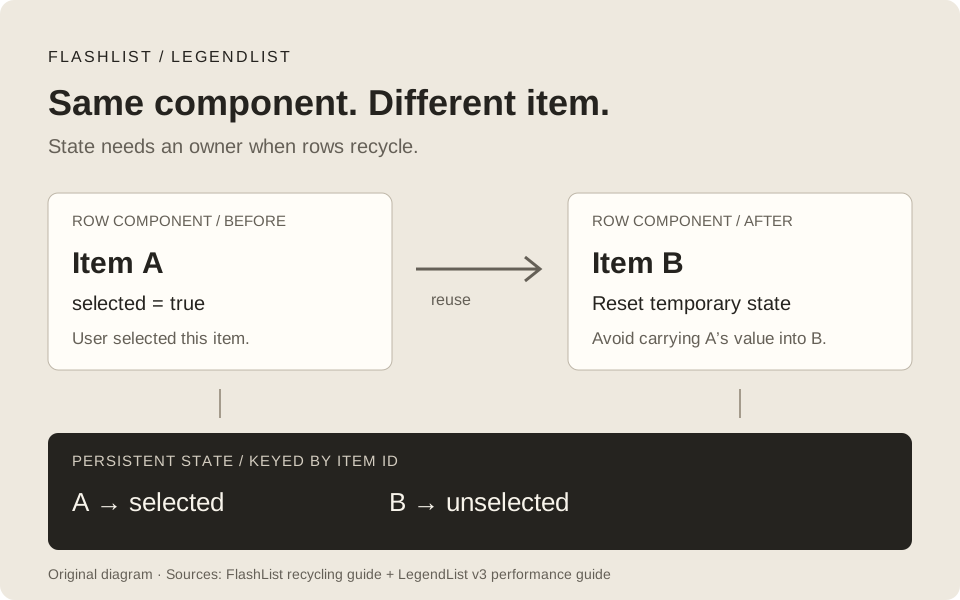
A feed can scroll smoothly and still show the wrong item as selected. A chat can render quickly and still drag you to the latest message while you are reading an older one. Changing the list component touches both performance and behavior.
FlashList and LegendList are worth comparing when mounting rows or correcting their layout is part of your bottleneck. My starting point is the actual screen: what is slow, what state must survive scrolling, and what should happen when data changes? A library swap needs to improve those things together.
Research checked October 4, 2026: this article targets FlashList 2.3.3 and LegendList 3.6.0. I checked the published npm packages as well as documentation and release notes. Examples are a reproducible starting point; this article does not report a device benchmark or a universal speed winner.
Illustration sources: FlashList recycling and LegendList v3 performance. Both diagrams in this article are original explanatory artwork, with no borrowed screenshot or benchmark chart.
Check the versions before copying a comparison
FlashList v2 requires React Native’s New Architecture. An app still using the old architecture cannot adopt v2 just by changing the import. Its migration guide also removes estimatedItemSize, estimatedListSize, and estimatedFirstItemOffset. A tutorial that tells you to tune FlashList’s required estimate is describing v1. FlashList v2 migration.
LegendList’s documentation has a different trap. At research time, v2 pages still called themselves the stable version and v3 pages displayed a beta label, while npm’s latest package was 3.6.0. I checked the published 3.6.0 package metadata and declarations to resolve that mismatch. In v3, the root component export is gone:
import { FlashList } from '@shopify/flash-list';
import { LegendList } from '@legendapp/list/react-native';
The /react entrypoint is for React DOM. It is a useful separate capability, but a browser demo using it does not establish native scrolling performance. LegendList v3 migration.
For a comparison branch in an existing React Native app, install the versions used here and retain the app’s own compatible React/RN versions:
npm install --save-exact @shopify/flash-list@2.3.3 @legendapp/list@3.6.0
npm ls react react-native @shopify/flash-list @legendapp/list
These pins make a result repeatable. Check newer release notes before adopting this example later.
| Decision | FlashList 2.3.3 | LegendList 3.6.0 |
|---|---|---|
| Architecture | New Architecture required | JS implementation; verify your RN/platform combination, particularly keyboard integrations |
| Row recycling | Enabled by default | Explicit opt-in with recycleItems; default is false |
| Dynamic row sizes | No developer-supplied size estimates | Measured sizes; optional estimate for initial allocation |
| Item state | Must account for a component receiving another item | Same requirement when recycling is enabled |
| Data-change anchoring | maintainVisibleContentPosition enabled by default |
Enable data anchoring explicitly; size stabilization alone is the default |
| Masonry | masonry prop, with column spans |
v3 API documents multi-column rows, not masonry |
| Web | React Native Web path | Separate React DOM entrypoint, plus RN entrypoint |
Sources for the table: FlashList usage, FlashList v2 architecture, LegendList native setup, v3 API, and migration. Treat platform support as something to verify on the platforms you ship.
Find the work a list replacement can remove
Virtualization limits how many rows are rendered around the viewport. Recycling additionally reuses a mounted row for another item, reducing repeated construction of its component and native view tree. Recycling does not make the row’s expensive calculations, oversized images, or subscriptions disappear.
FlashList v2 uses synchronous layout measurement available through the New Architecture. Shopify describes progressive rendering, predictions based on measured item types, and corrections before paint. “No estimates required” means the caller does not provide estimates; the implementation still predicts sizes for unmeasured items. Shopify’s v2 engineering explanation.
LegendList also measures rows and updates its layout. In v3, estimatedItemSize is optional and mainly influences the initial number of allocated containers. Its documented initial fallback is 100 layout units. You usually do not need to tune it for an ordinary dynamic feed. getFixedItemSize is useful only when you can guarantee the rendered size. Wrapping text, accessibility font sizes, expanded content, and late image dimensions can invalidate that guarantee. LegendList v3 performance.
Use a release build to distinguish the symptoms:
| Symptom you can reproduce | What to investigate first |
|---|---|
| Empty space during a fast fling | Row mount cost, rendering ahead, layout work, and the installed patch version |
| Scrolling moves, but taps respond late | JS work during scrolling: row renders, parsing, filtering, subscriptions |
| Images stall or flash | Decode cost, source dimensions, caching, and image state when a row changes item |
| Position jumps after prepend or resize | Item identity and anchoring policy |
| Selection appears on another row | State attached to a recycled component |
React Native distinguishes JS frame rate from UI frame rate: native scrolling can continue while the JS thread is busy. A smooth swipe therefore does not prove responsive buttons. Its performance guide also requires release-mode testing. React Native performance overview.
If your current FlatList already meets the screen’s requirements, keep that baseline. The FlatList performance article covers row work and identity before you add a dependency.
Put persistent row state behind the item ID
Consider a product row with const [selected, setSelected] = useState(false). The user selects product A. When that row component is recycled for product B, its state can still be true. Both libraries need recycling-aware state ownership in that situation. FlashList recycling, LegendList recycling guidance.
Turning recycling off avoids that particular carryover, but offscreen rows can still unmount. State that should survive scrolling belongs outside the row, indexed by item ID. Examples include cart selection, edited form values, and saved preferences. A reset hook is suitable for temporary state that should start fresh on a different item; it does not store a value for every item you have visited.
Here is a complete comparison screen, saved as ListComparison.tsx. Mount one variant per run. It uses the same data, row, selection state, and layout for FlatList, FlashList, LegendList without recycling, and LegendList with recycling.
import React, { memo, useCallback, useState } from 'react';
import { FlatList, Pressable, StyleSheet, Text, View } from 'react-native';
import { FlashList } from '@shopify/flash-list';
import { LegendList } from '@legendapp/list/react-native';

type Product = { id: string; title: string; description: string };
type Variant = 'flat' | 'flash' | 'legend' | 'legend-recycle';

const products: Product[] = Array.from({ length: 1000 }, (_, index) => ({
  id: `product-${index}`,
  title: `Product ${index + 1}`,
  description: index % 4 === 0
    ? 'A longer description that wraps on a narrow display. Use your actual product text when profiling.'
    : 'A short product description.',
}));

const keyExtractor = (item: Product) => item.id;

const ProductRow = memo(function ProductRow({ item, selected, onToggle }: {
  item: Product;
  selected: boolean;
  onToggle: (id: string) => void;
}) {
  return (
    <Pressable
      accessibilityRole="checkbox"
      accessibilityState={{ checked: selected }}
      accessibilityLabel={item.title}
      onPress={() => onToggle(item.id)}
      style={[styles.row, selected && styles.selected]}
    >
      <Text style={styles.title}>{selected ? '✓ ' : ''}{item.title}</Text>
      <Text>{item.description}</Text>
    </Pressable>
  );
});

export default function ListComparison({ variant = 'flash' }: {
  variant?: Variant;
}) {
  const [selectedIds, setSelectedIds] = useState<Set<string>>(() => new Set());

  const onToggle = useCallback((id: string) => {
    setSelectedIds(previous => {
      const next = new Set(previous);
      if (next.has(id)) next.delete(id);
      else next.add(id);
      return next;
    });
  }, []);

  const renderItem = useCallback(({ item }: { item: Product }) => (
    <ProductRow
      item={item}
      selected={selectedIds.has(item.id)}
      onToggle={onToggle}
    />
  ), [selectedIds, onToggle]);

  const shared = { data: products, keyExtractor, renderItem, extraData: selectedIds };

  return (
    <View style={styles.screen}>
      <Text style={styles.status}>
        {variant} · {selectedIds.size} selected
      </Text>
      {variant === 'flat' ? (
        <FlatList {...shared} />
      ) : variant === 'flash' ? (
        <FlashList {...shared} />
      ) : (
        <LegendList {...shared} recycleItems={variant === 'legend-recycle'} />
      )}
    </View>
  );
}

const styles = StyleSheet.create({
  screen: { flex: 1, backgroundColor: '#fff' },
  status: { padding: 16, color: '#111' },
  row: { padding: 16, borderBottomWidth: 1, borderBottomColor: '#ddd' },
  selected: { backgroundColor: '#dcebdc' },
  title: { fontWeight: '600', marginBottom: 6 },
});
Start with <ListComparison variant="flash" />, then run the other variants separately. Select a product, scroll several screens away, return, and verify that only the selected ID remains checked. Repeat with recycled LegendList. Returning to a selected row should derive its value from selectedIds, even if a different component now renders it.
This example deliberately uses extraData for simple whole-list invalidation. A selection change reevaluates rendered rows; memo can skip unchanged row props. For frequent updates or expensive rows, use a store with item-scoped subscriptions so changing one ID does not notify the entire list. LegendList specifically advises avoiding frequent extraData updates. Measure this separately from idle scrolling. LegendList v3 performance.
Do not add key={item.id} to ProductRow as a quick recycling fix. A changing React key forces that subtree to remount, giving up reuse. The list’s keyExtractor identifies data; keys inside the recycled subtree control React reconciliation. They serve different purposes. Nested mapped children still need valid keys; FlashList supplies useMappingHelper for that case. FlashList component performance.
The fixture contains text only, intentionally isolating list work. Before a shipping decision, replace it with your real image, gesture, subscription, and row-layout workload. A library that wins this simple fixture may lose its advantage on your screen.
Reset temporary state with the correct library hook
For an expandable row that should collapse when the component receives a new item, FlashList offers useRecyclingState. Its dependency array identifies when to reset. This complete row expects { id: string; title: string; details: string } items:
import React from 'react';
import { Pressable, Text } from 'react-native';
import { useRecyclingState } from '@shopify/flash-list';

type Entry = { id: string; title: string; details: string };

export function FlashExpandableRow({ item }: { item: Entry }) {
  const [expanded, setExpanded] = useRecyclingState(false, [item.id]);
  return (
    <Pressable
      accessibilityRole="button"
      accessibilityState={{ expanded }}
      onPress={() => setExpanded(value => !value)}
      style={{ padding: 16 }}
    >
      <Text>{item.title}</Text>
      {expanded && <Text>{item.details}</Text>}
    </Pressable>
  );
}
LegendList has a hook with the same name and a different signature. Its row context detects the item change; you do not pass FlashList’s dependency array:
import React from 'react';
import { Pressable, Text } from 'react-native';
import { useRecyclingState } from '@legendapp/list/react-native';

type Entry = { id: string; title: string; details: string };

export function LegendExpandableRow({ item }: { item: Entry }) {
  const [expanded, setExpanded] = useRecyclingState(false);
  return (
    <Pressable
      accessibilityRole="button"
      accessibilityState={{ expanded }}
      onPress={() => setExpanded(value => !value)}
      style={{ padding: 16 }}
    >
      <Text>{item.title}</Text>
      {expanded && <Text>{item.details}</Text>}
    </Pressable>
  );
}
Return these components from the respective list’s render callback, for example renderItem={({ item }) => <LegendExpandableRow item={item} />}. Do not call a hook-using component as an ordinary function. Keep LegendList’s hook inside its own rendered row context. Sources: FlashList recycling hook and LegendList recycling hooks.
Also inspect effects, refs, uncontrolled inputs, and asynchronous callbacks. An image request started for A can finish after the row receives B. Resetting a boolean does not cancel that work. Key requests by item identity and clean up or ignore stale completions. If expanded state must survive a round trip offscreen, use the ID-based approach instead of either reset hook.
Keep chat anchoring separate from following new messages
A chat needs several distinct behaviors: open at the newest message, keep an older message in place when history is prepended, follow incoming messages when already near the bottom, and let the reader stay in history when they scroll away.
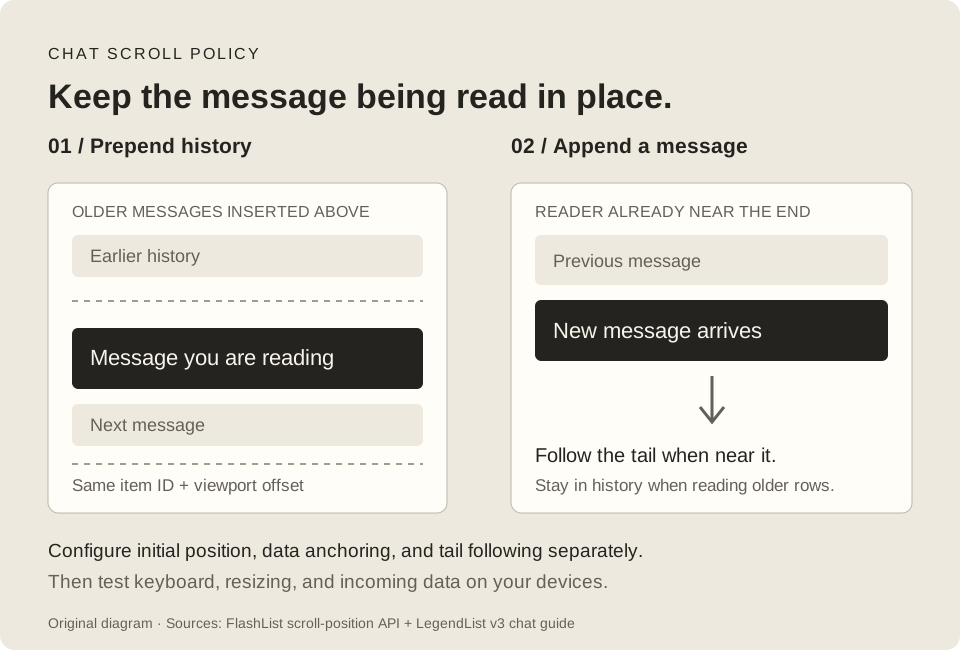
Diagram references: FlashList scroll-position settings and LegendList chat and initial-position guides.
In LegendList v3, omitted maintainVisibleContentPosition stabilizes size changes but does not opt into data-change anchoring. Pass true when prepending history. alignItemsAtEnd aligns a short conversation; initialScrollAtEnd sets the initial position; maintainScrollAtEnd follows the tail when near it. The threshold is a fraction of the viewport: 0.1 means 10%, not ten pixels. LegendList v3 API.
This complete MessageTimeline.tsx exports a timeline for each library and accepts messages already ordered oldest to newest. Mount one export at a time. It leaves fetching and the keyboard/composer to the surrounding screen.
import React from 'react';
import { StyleSheet, Text, View } from 'react-native';
import { FlashList } from '@shopify/flash-list';
import { LegendList } from '@legendapp/list/react-native';

export type Message = { id: string; author: string; text: string };

const keyExtractor = (item: Message) => item.id;
const renderItem = ({ item }: { item: Message }) => (
  <View style={styles.message}>
    <Text style={styles.author}>{item.author}</Text>
    <Text>{item.text}</Text>
  </View>
);

export function MessageTimeline({ messages }: { messages: Message[] }) {
  return (
    <View style={styles.screen}>
      <LegendList
        data={messages}
        keyExtractor={keyExtractor}
        renderItem={renderItem}
        recycleItems
        alignItemsAtEnd
        initialScrollAtEnd
        maintainVisibleContentPosition
        maintainScrollAtEnd={{ animated: false }}
        maintainScrollAtEndThreshold={0.1}
      />
    </View>
  );
}

export function FlashMessageTimeline({ messages }: { messages: Message[] }) {
  return (
    <View style={styles.screen}>
      <FlashList
        data={messages}
        keyExtractor={keyExtractor}
        renderItem={renderItem}
        maintainVisibleContentPosition={{
          autoscrollToBottomThreshold: 0.1,
          animateAutoScrollToBottom: false,
          startRenderingFromBottom: true,
        }}
      />
    </View>
  );
}

const styles = StyleSheet.create({
  screen: { flex: 1, backgroundColor: '#fff' },
  message: { padding: 16 },
  author: { fontWeight: '600', marginBottom: 4 },
});
When history arrives, create a new array such as setMessages(current => [...olderPage, ...current]), preserving chronological order and deduplicating IDs. Append new messages at the other end. Test the component with both operations while the reader is at the tail and while reading history. If your Android app predates RN 0.72, check compatibility: LegendList’s data anchoring uses the underlying ScrollView position-maintenance support. LegendList v3 API.
FlashList expresses its scroll policy through an object. Its default anchoring is enabled, and the object exposes autoscrollToBottomThreshold, animateAutoScrollToBottom, and startRenderingFromBottom. Do not copy LegendList’s boolean or tail-follow props onto it. Conversely, FlashList’s disable form is maintainVisibleContentPosition={{ disabled: true }}. Sorting can produce surprising movement with anchoring enabled, a behavior Shopify documents explicitly. FlashList scroll-position API, known issues.
Neither timeline configuration completes a chat screen. Verify keyboard opening, composer height changes, safe areas, image loads, long messages, unread markers, and switching conversations. LegendList v3 offers a separate KeyboardAwareLegendList integration; its dependencies and setup belong in a dedicated keyboard test, not a copied web example. LegendList native keyboard integration.
Benchmark four configurations on the same screen
The useful comparison is FlatList, FlashList, LegendList without recycling, and LegendList with recycling. A default-to-default result includes a different recycling policy. Label each configuration so a reader can understand what you measured.
My suggested protocol is five repeated runs per configuration on a lower-end Android device and a representative iPhone. This is a testing recommendation, not a published result. Keep RN, Hermes, build mode, data order, row content, viewport, font settings, image cache conditions, and gestures consistent. Run one list at a time. Allow the device to cool between sustained runs and rotate the order to reduce warm-cache and thermal bias.
| Workload | Record | Failure to watch for |
|---|---|---|
| Cold screen entry | First useful content and first responsive interaction | Fast text paint followed by blocked taps |
| Fast down/up fling | JS and UI frame timing, blank regions | Average FPS hides a long stall |
| Select or expand while scrolling | Input response and render work | A shared update reevaluates too many rows |
| Prepend history | Visible item ID and offset before/after | History insertion moves the message being read |
| Append at tail and in history | Follow behavior in both positions | New messages interrupt reading |
| Late image resize, rotation, large fonts | Anchor correctness and layout corrections | Assumed fixed heights become wrong |
| Repeated screen entry/exit | Memory after settling, effect cleanup | Recycled media or subscriptions retain resources |
Record median and slowest run for time measurements, and keep frame-time distributions or traces where possible. Define acceptable blanking and interaction latency for your product before looking at the results. Save recordings alongside the traces; scroll correctness needs visual evidence.
FlashList’s useBenchmark automates scrolling and reports JS FPS, interruption status, and suggestions. It is useful for regression checks within FlashList. Its JS FPS result alone does not measure UI frame pacing, image decode, memory, or the response to a tap, and it is not a neutral harness for the other list. FlashList profiling guide.
Use release timing runs for the decision and separate instrumented profiling runs to explain the bottleneck. Diagnostic tools can affect timings. Keep cold and warm image-cache results separate; otherwise the second library you try can receive an accidental advantage.
I would not choose a winner from an old GIF, a maintainer’s “faster” claim, or a table without the app, versions, device, and recycling settings. Both projects promote their performance. Those demonstrations can suggest a workload to test; they cannot predict your row tree’s behavior.
Patch versions and maintenance change the decision
FlashList 2.3.3, released October 1, 2026, fixes blank rows during fast scrolling with a small drawDistance. LegendList 3.3.11, released September 11, includes fixes around following the tail and changes during scrolling; 3.6.0 adds alignment fallback for oversized items. If you reproduce those symptoms, check your installed patch and the relevant release note before rewriting your data layer. These are documented fixes, not claims that the latest releases still have those bugs. FlashList 2.3.3, LegendList 3.3.11, LegendList 3.6.0.
There is also a dated maintenance change. In its September 10, 2026 announcement about moving its apps to native, Shopify says it will keep fixing critical compatibility issues in FlashList and is discussing long-term stewardship with other companies. That is narrower than assuming indefinite feature investment. The October patch shows subsequent release activity; it does not settle future stewardship. Shopify’s announcement, FlashList section.
For a new dependency, include ownership and your willingness to patch it in the review. LegendList’s recent release activity is useful evidence, but release frequency alone does not establish support capacity or compatibility with your next RN upgrade.
Choose for the screen you have to maintain
I would test FlashList first for a New Architecture screen where recycling and its masonry support fit the layout. I would test LegendList early for a chat/timeline needing its explicit tail-follow controls, or a product sharing virtualization concepts with a React DOM interface. For a stateful screen under migration, LegendList without recycling gives you a separate configuration to evaluate while you audit the rows. Those are starting points for the four-way test, not speed guarantees.
Before switching, walk through these migration details:
- FlashList v1 to v2: confirm New Architecture, remove old estimate props, and review the new default anchoring behavior.
- LegendList v2 to v3: update imports, remove
getEstimatedItemSize, changegetFixedItemSizecallbacks to(item, index, type), and replacestickyIndiceswithstickyHeaderIndices. Await imperative scrolling if later work depends on its completion. - Any recycling migration: audit local state, effects, image callbacks, and changing keys inside rows. Use stable data IDs. For heterogeneous rows, group by a small number of structural types with
getItemType; an item ID is not a useful pool type. - Any layout migration: retest sorting, prepending, late measurement, and scroll-to-index with accessibility text sizes. Check platform-specific limitations rather than assuming FlatList-compatible names mean identical behavior.
Migration references: FlashList v2, LegendList v3, FlashList row optimization.
The acceptance test I would put in the ticket is concrete: select product A, fling away and back, prepend data, and confirm that A is still selected while B is not. Then open the chat, scroll into history, receive a message, and confirm the reader stays in place. Attach the release-build traces and recordings from those exact flows to the dependency decision.
End of note
← Back to articles